My Experience with Lovable.dev
In this post, I wanted to share my personal experience of building a modern chatbot UI using Lovable.dev as the main "editor" and "AI assistant". What started as a simple UI prototype evolved into a comprehensive chatbot application with authentication integration, LLM API connectivity, and a fully functional chat interface with persistence.
TL;DR;
Lovable.dev is impressive for rapid UI development, but requires specific prompting and iterative refinement to achieve production-ready results.
Starting with Lovable.dev
I began my chatbot project by exploring Lovable.dev, an AI-powered development platform that promised to accelerate UI creation, by trying to replicate a previous attempt at a chatbot UI done "by hand" (i.e. just me coding it!). The initial experience wasn't so impressive but good enough to keep me intrigued, interested and wondering if I could try a better approach. As such, when I detailed out my request and improved my prompt, the results were far more impressive and genuinely great - I was able to describe my vision for a "simple chatbot UI" and Lovable.dev generated a complete React application with TypeScript, Vite, and shadcn-ui components.
The generated codebase included:
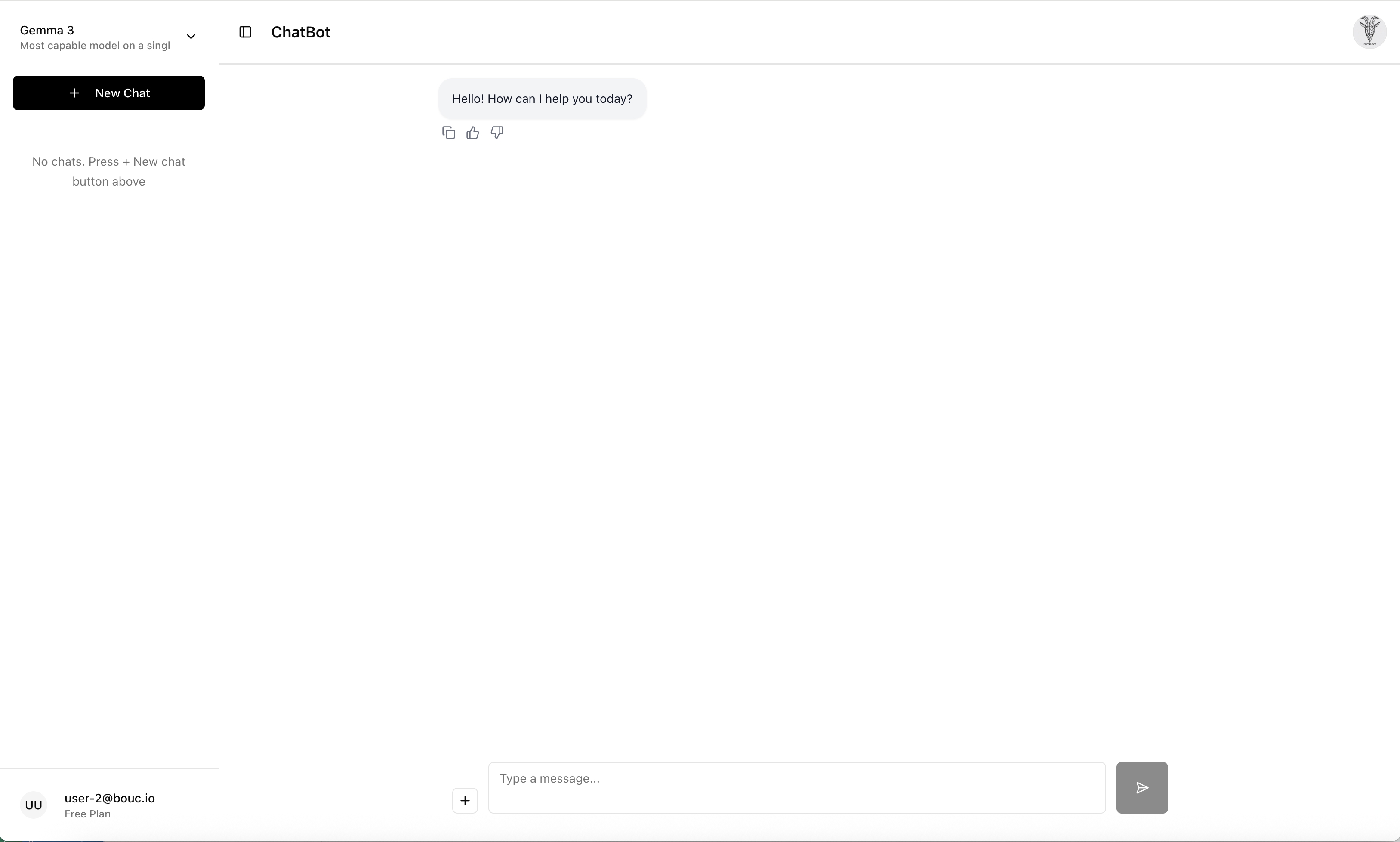
- A clean, responsive chat interface with message bubbles (working!)
- Sidebar with chat history and model selection (working!)
- Settings overlay with theme switching (light/dark mode) and language setting (working!)
- File attachment capabilities and conversation actions (not fully implemented yet)
Here's the UI end result rendered by Lovable.dev and integrated within entire infrastructure stack
(which leverages among others Kubernetes, Helm, Istio, Keycloak, OAuth2-proxy, Metrics-Server):
// Example of the generated component structure
src/
├── components/
│   ├── ChatSidebar.tsx      // Chat history and model selection
│   ├── ChatHeader.tsx       // Header with user info
│   ├── ChatInput.tsx        // Message input with attachments
│   ├── ChatMessage.tsx      // Individual message bubbles
│   └── SettingsOverlay.tsx  // User settings and preferences
├── auth/
│   ├── adapters/            // Identity provider adapters
│   └── authcontext.tsx      // Authentication context
└── lib/
    ├── ollamaApi.ts         // LLM API integration
    └── models.ts            // Model configuration
The Development Journey with Lovable.dev
Looking at my interaction history with Lovable.dev, I can trace the evolution of this project through specific requests and iterations. The development process revealed both the strengths and limitations of AI-assisted development.
Initial Setup and Core Features
The project started with Lovable.dev generating the basic UI structure. I originally had it get the foundation laid with Vite, React, and shadcn-ui components. It is important to note, I specifically picked and specified the framework to use and to some extent, how to use it. Previous attempt had created a weak application from that perspective with little capacity to improve it or develop on it; the original version created seemed to work only on Lovable.dev. Once I specified the framework, etc., I was able to run on Lovable.dev and locally for local development. Afterwards, the initial generated code was impressive but required specific prompting to achieve the desired functionality.
Key early achievements included:
- Creating a chat interface with proper message bubbles and styling
- Implementing a sidebar with chat history and model selection
- Adding dark/light theme switching functionality
- Setting up the basic project structure with TypeScript and Vite
The Authentication Challenge
One of the most significant challenges I faced was implementing Keycloak authentication. I struggled for a long time (to say the least!) to get the Keycloak implementation working in the chatbot UI, although I knew it was working in my previous "manual" project. The issue wasn't with Keycloak itself, but with integrating it properly into the React application generated by Lovable.dev using the Keycloak JavaScript adapter.
The authentication integration involved many, many iterations with Lovable.dev:
- Fixing infinite redirect loops in the authentication flow
- Implementing proper token handling and refresh logic
- Creating identity provider adapters for different authentication methods
- Debugging authentication flows and state management
This phase required the most back-and-forth with Lovable.dev, as the AI needed to understand the specific requirements of Keycloak integration and how to properly handle authentication state in a React application. Myself not being so strong on this front, I had to do a lot of trial and error to get it working. I had to do a lot of research on the Keycloak JavaScript adapter myself (even though I would assume it is fairly standard at this point) and how to properly use it in a React application. Every change I made required a whole cycle waiting for Lovable.dev to complete the changes, have them committed to GitHub, then for me to pull them locally and boot up the UI locally in the integration setup with my local cluster. A tedious process that took a very long time!
API Integration and Testing
Implementing the API integrations for Ollama and my chatbot API (the one persisting the various chats and messages, etc.) was fairly easy, although slightly longer to test out since I had to put the request in Lovable, then get the code locally to test it running locally. By giving detailed prompt, Lovable.dev was able to complete the integrations entirely on its own.
The API integration process involved:
- Creating API configuration for Ollama's REST API
- Implementing chat management API calls for saving conversations
- Adding proper error handling and retry logic
- Setting up environment-based configuration
This iterative process of requesting code from Lovable.dev, implementing it locally, testing, and then requesting refinements became the standard workflow for the project. In order to properly create the API integration, I provided a detail REST API design, where to put the code, when to make each call within the UI flow and let it handle the code implementation. Using that technique, it was fairly quick and very impressive. It could clearly logically implement the API call, it just required the specifics requiremnts to meet.
UI Enhancements and Bug Fixes
As the project progressed, I discovered various UI issues that needed attention. Althought it created those bugs itself, Lovable.dev proved valuable for quickly implementing fixes and enhancements:
- Model Selector Issues: Fixed the model selector dropdown that kept defaulting back to "Llama 3.2" instead of maintaining user selection
- Chat Page Flickering: Resolved infinite re-render loops that caused screen flickering when chats were selected. This was probably the biggest bug the AI assistant introduced while working on other items and required a few prompts to resolve.
- About Page Bug: Fixed authentication re-looping issues when trying to display the about overlay
- Dark Mode Styling: Corrected dark mode implementation for the chat input area
- Chat Renaming: Implemented inline rename functionality for chat titles
- Model Picker Display: Fixed text wrapping and ellipsis for long model descriptions
Login Page Customization
I also used Lovable.dev to customize a few components of the app, such as the login experience:
- Changed the button text from "Sign in with Keycloak" to "Sign in with email or username"
- Added a "Sign in with Google" button (placeholder for future implementation)
- Improved the overall user experience of the authentication flow
Key Learnings from Lovable.dev
This experience was overall very good and it definitely helped refactoring my UI chatbot, while learning about AI-assisted development:
One-shot success: chat renaming
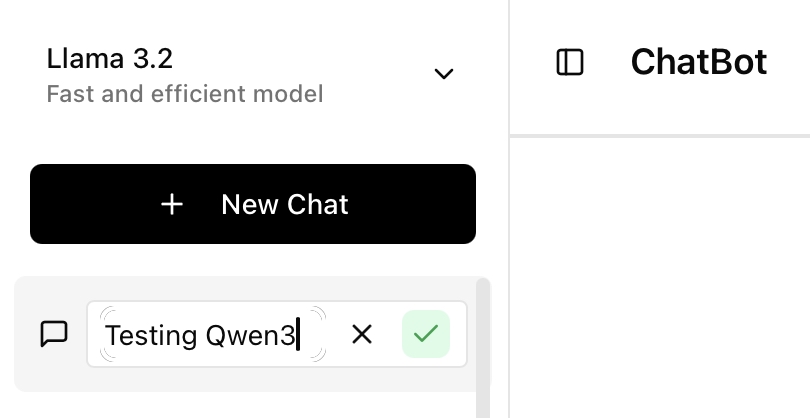
One of the most impressive moments using Lovable.dev was adding the chat renaming feature. I already had the REST API ready and tested independently in Postman. After writing a detailed prompt, Lovable.dev generated the entire UI and wiring correctly on the first try. Here’s the prompt I used:
                    In the dot-dot-dot button of the chat objects on the left side bar, if the user clicks on "Rename",
                    add the code to first, display a one-line textbox bar at the place where the chat's title is (the one
                    where the "Rename" option was selected from), pre-loaded it with the value of the chat's title.  the
                    whole textbox bar should be wrapped within a rectangle displaying the textbox aligned on the left side
                    and at the end of it on the right side, 2 buttons, one with a red X button to cancel the action (if
                    that one is clicked, return in the previous view by removing the textbox, rectangle and buttons), and
                    one with a green checkmark (if clicked, the action should call the updateChat method with the new title
                    entered, if the API call is successful, the chat object is changed in the state and the left side bar
                    object is refreshed to display the new state; if API unsuccessful, it gives a simple javascript pop
                    error and the rectangle, text bar and buttons are removed).
Here is the result:
Lovable.dev Strengths
- Rapid Prototyping: Generated a complete, working UI in minutes
- Modern Stack: Although it needed to be prompted to do so at first, uses current best practices (React 18, TypeScript, Vite) once ongoing
- Component Quality: Generated components were well-structured and extensible (at least in my view!)
- Quick Iterations: Easy to request changes and improvements
- Quick features additions: Although I speak only French and English (and currently learning Spanish), Lovable.dev was able to add all 3 languages quickly and easily without me being fluent on it. I suspect a lot of languages support will be added in the near future to all applications out there, to the benefits of those communities.
- Bug Fixing: Excellent for quickly identifying and fixing common issues
Development Process Insights
- Specific Prompting Required: The quality of output directly correlates with the specificity of requests. In other words, yes, it can achieve a certain level with simple prompts, however, if you want the project to last, you need to be specific and detailed in your requests, including specific design patterns to use, technologies components or frameworks to leverage, and code implementation to follow.
- Iterative Refinement: Multiple iterations are often needed to achieve the desired result
- Testing Integration: Code needs to be tested locally after generation, creating a feedback loop longer than usual or than with other tools like Claude Code or Gemini CLI, where those are changing directly in the local working directory of the user as opposed to Lovable.dev doing its changes to its own local working directory.
- Context Awareness: Lovable.dev maintains good context across multiple requests in a session
- Complex Integration Challenges: Authentication and API integrations require multiple iterations
Limitations and Challenges
- Authentication Complexity, as an example: Keycloak integration required significant debugging and multiple attempts and I suspect it would be the same for any integrations requiring various components outside of the project. In other words, if everything is contained within the project, Lovable.dev will have an easier time to figure out the proper implementation.
- Error Handling, as an example for code quality: Some edge cases and error scenarios needed manual intervention, especially on improving it for debugging purposes later on.
Current State and Future Plans
The chatbot UI is now running on my local Kubernetes cluster with a fully functional UI that includes:
- ✅ Modern React UI with TypeScript and Vite
- ✅ Ollama LLM integration
- ✅ Keycloak authentication with OAuth 2.0
- ✅ Chat management and persistence
- ✅ Dark/light theme switching
- ✅ Responsive design with sidebar navigation
- ✅ Model selection and chat history
Future enhancements planned:
- Some feature implementation, such as File attachment functionality
- Google OAuth integration
- Improved code quality and error handling, still
Conclusion
Lovable.dev proved to be an excellent tool for rapid UI development and iterative refinement. The generated code was solid and followed modern React patterns (again, at least, what it seems to me!). The key to success was providing specific, detailed requirements and being prepared for multiple iterations to achieve the desired functionality.
This small experience demonstrates, at least for me, how an AI-powered development tool like Lovable.dev can accelerate the initial development phase as well as provide ongoing support for bug fixes and enhancements. The combination of rapid prototyping with iterative refinement creates a powerful development workflow that can significantly reduce development time while maintaining code quality. I will certainly look into equivalent tooling within the context of my work to adjust certain workflows, giving me ideas for a larger use more than I was already doing.
The entire journey, from initial Lovable.dev prototype to a running chatbot UI, took approximately 3 months and resulted in a chatbot single page app that serves as an excellent example of AI-assisted development. To compare, my initial chatbot UI built "manually" using the same stack had taken me 3 months as well but wasn't anywhere near the level of completion (most of it actually didn't work!).
This is definitely the future!
AI Usage Disclosure
This document was created with assistance from AI tools. The content has been reviewed and edited by a human. For more information on the extent and nature of AI usage, please contact the author.